Recently, one of our users asked us how
they can list scheduled or future upcoming posts in WordPress. Showing
upcoming posts can be helpful in getting people to subscribe to your
blog. In this article, we will show you how to display future upcoming
posts in WordPress sidebar.
What is Scheduled or Future Upcoming Posts in WordPress?
If you have been blogging for a while, then you have probably noticed
that publishing posts on a certain time gets more people to read it. If
you are new to blogging and don’t know what time you get the most
visitors, then you should start using
Google Analytics to track this information.
The problem is that you cannot just sit around and wait for that time
to hit the publish button. That’s why WordPress comes with built-in
scheduling feature. It allows you to
schedule your posts to be published later.
Using scheduling you can focus on creating content and managing your editorial calendar like a pro.
Having said that, let’s see how you can show off your upcoming posts in WordPress and use it to get more subscribers.
To make it easy, we have created a video tutorial on how to list future upcoming scheduled posts that you can watch below.
However if you just want to follow text-instructions, then you can
follow our step by step tutorial on how to list future upcoming
scheduled posts in WordPress.
Method 1: Showing Scheduled or Future Posts with Plugin
First thing you need to do is install and activate
SOUP – Show off Upcoming Posts plugin. For more details, see our step by step guide on
how to install a WordPress plugin.
Upon activation, you need to visit
Appearance » Widgets
page. There you will find ‘Upcoming Posts’ widget under the list of
available widgets. Simply add the widget to your sidebar where you to
display scheduled posts.
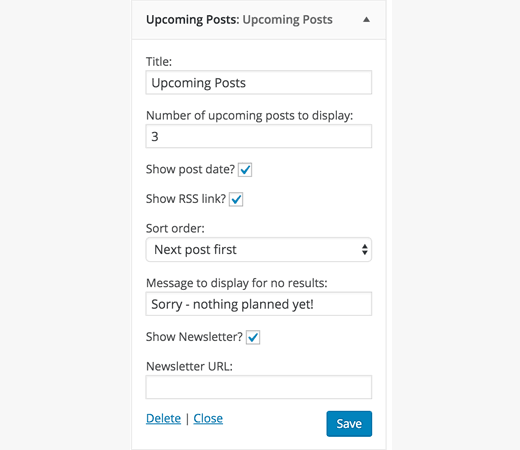
The widget settings allow you to choose the number of scheduled posts
you want to show. You can also show dates next to them, link to your
RSS feed, or link to a page where users can signup for your
email list.
Click on the save button to store your widget settings.
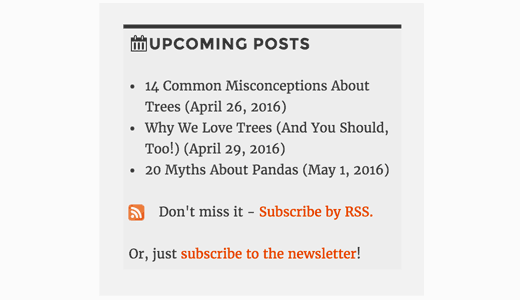
You can now visit your website to see the widget in action.
Method 2: Showing Scheduled or Upcoming Posts Manually
Simply add this code to your theme’s
functions.php file or a
site-specific plugin.
01 | function wpb_upcoming_posts() { |
03 | $the_query = new WP_Query(array( |
04 | 'post_status' => 'future', |
05 | 'posts_per_page' => 3, |
11 | if ( $the_query->have_posts() ) { |
13 | while ( $the_query->have_posts() ) { |
14 | $the_query->the_post(); |
15 | $output .= '<li>' . get_the_title() .' ('. get_the_time('d-M-Y') . ')</li>'; |
21 | $output .= '<p>No posts planned yet.</p>'; |
32 | add_shortcode('upcoming_posts', 'wpb_upcoming_posts'); |
34 | add_filter('widget_text', 'do_shortcode'); |
Now you can visit
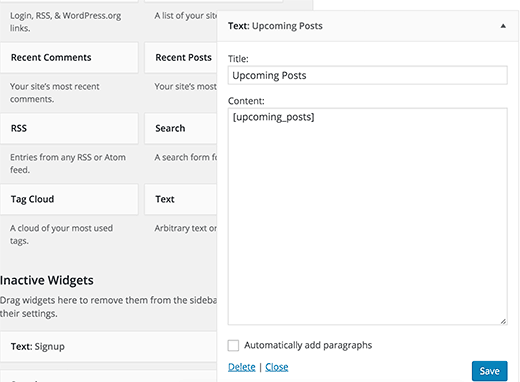
Appearance » Widgets page. Add a text widget to your sidebar where you want to display upcoming posts and add this
shortcode inside the widget.
[upcoming_posts]
Click on the save button to store your widget settings.
You can now visit your website to see the upcoming scheduled posts in
your sidebar. You can also use this shortcode in a post, page, or a
template in your child theme.
We hope this article helped you learn how to show scheduled posts in
your WordPress sidebar. You may also want to see our list of these 25 most useful WordPress widgets for your site.

No comments:
Post a Comment